Physical Address
304 North Cardinal St.
Dorchester Center, MA 02124
Physical Address
304 North Cardinal St.
Dorchester Center, MA 02124

The issue of Facebook privacy seems to be one of those that everyone recognizes as significant, but practically nobody wants to devote an afternoon on a Saturday to it. I totally sympathize with that. We use Facebook in order to see what our friends are up to, watch some videos, see how our favorite business page does, or somehow find ourselves spending 40 minutes watching Reels because we said we would look at just one notification.
The thing is that beyond this rather simple process lies a more complex mechanism which consists of personal data, advertising, activity from other sites and applications, accounts settings, cookies and data management. That is why the topic of Facebook privacy becomes relevant not only for tech-savvy people but even for regular users as well. Currently, the facebook privacy information offered by Meta covers all the details of collection, use, sharing, storing and managing of information within the company’s products, while Facebook offers some means that may help users manage their information.
There is also one critical clarification needed for many old articles on Facebook privacy. Off Facebook Activity appeared many years ago and should not be considered a novel 2026 innovation. Meta has also renamed and updated the process through which these controls work, and copying an old privacy article and just replacing the year in it with 2026 would create a distorted view.
In my guide, my intention is to adopt a better strategy: instead of presenting all the privacy options as being something new, I am going to clarify what the major terms are, in what cases older information is outdated, and what actions you can take. I want to give you sufficient knowledge to make your own decisions regarding your personal information, not scare you away from using Facebook.
Privacy makes more sense when your Facebook account ceases to be one single box holding your name, date of birth, and profile photo. You may generate numerous types of information through interacting with the platform in a way that includes information you choose to share and information generated through interaction. The posts, comments, reactions, searches, interactions with content and interactions with people can help in shaping up the experience you receive from Facebook.
There can be information that may be associated with devices, browsers and activity out of Meta’s services depending upon the type of technology used and choices you make. It doesn’t mean that all the information that you have generated is sitting somewhere in one big folder saying “Everything Muneeb Has Ever Done”. The reality is far more complex and your actual information depends upon the way you use Meta products, what kind of permissions you give and what services you interact with.
The problem of privacy on Facebook does not have to do with Facebook having some kind of unique capability to know everything there is to know about you. The larger problem has to do with the way in which contemporary online services work through interconnected systems. You could browse a website, download an app, click on a product, respond to an ad, and go back to Facebook all in one chain without giving any thought to the connection between all of those actions.
There are privacy controls because people need to have insight into the way in which these ecosystems work. Meta’s official Privacy Centre along with their privacy policy documentation offer information on their privacy policy, and Facebook connects people to the controls such as settings and activities.
One of the key issues with online privacy articles is that they become outdated very fast. A headline might claim that there is a “new Facebook privacy policy,” but the information below refers to some feature implemented many years ago. It is essential because those looking for information in 2026 need up-to-date background rather than a stale headline.
For instance, off Facebook activity feature exists for many years already, and Meta’s privacy terminology and settings have changed since then. Moreover, privacy settings and ads settings can change in terms of location, wording, and existence; therefore, an outdated screenshot might become irrelevant when it comes to one’s own account.
This does not mean that old privacy features are irrelevant. To the contrary, the questions posed by them are still valid. Namely, what kind of information is gathered? Why is it collected? Which data can be accessed by other services? How long is the information stored? What kinds of options does a user have?
This list of questions is much more relevant than the discussion of where exactly some button is now located. However, in case you are going through your account, you should go by the settings and Privacy Centre provided by Facebook at present and not use some outdated tutorial. In the Facebook policy hub, the user is directed to Facebook Privacy Policy, Facebook Privacy Centre, and other settings and activities controls; however, some policy pages might need the login to be accessible.
Privacy policy is like a rule book on how the company handles the information. Regrettably, the problem with privacy policies is that they are created as a precise legal document and not a bedtime story; therefore, a common person is able to open a document and get an impression that he or she has enrolled into a course on law degree. However, the actual issues people want to have resolved are quite simple. One would like to know what kind of information the company has received, how it uses the information, when the company shares the information, what kind of options there are, and what will happen if some data or account is deleted.
The biggest takeaway here is that having a privacy policy does not mean that there will be no user control. The former defines company policies and its legal context, while the latter defines at least some of your options. Imagine that you are renting an apartment; the lease defines the terms, but you get keys to decide which doors you unlock. Your Facebook account operates in a somewhat similar fashion. It is impossible for you to personally change the entire data policy of Meta, but you can check the existing settings, control some permissions and decide whether to share something publicly or privately.
It may seem logical to put all types of information collected into one of two categories – “information that I provided to Facebook” and “information that Facebook collected”. Sometimes, however, the lines may be blurred. While you are providing some pieces of information consciously – creating profile information, uploading photos, writing posts or sending messages – others can be collected by Facebook due to your interaction with it.
In some cases, technical information related to the devices, browsers, and network connections, as well as interactions with different services, may become a part of information that is processed through online platforms. What is more important is that the issue of privacy is not limited to just the information you entered into your “About Me” box.
That is why I suggest examining the issue of Facebook privacy as an ecosystem in its entirety instead of focusing only on one option. For example, if you choose to hide your birthday but do nothing with any other options, you may protect yourself from the invasion of privacy in one small way but not overall. It also works the same way for advertising preferences.
Making one change does not mean that Facebook will stop processing all information related to your account. Privacy maintenance is very similar to gardening: it should be done once in a while and involves removal of unwanted items and examination of any new growth.
The concept of off facbook activity is perhaps the most valuable idea to grasp when trying to determine how activity outside facebook can connect to your Meta experience. Traditionally, Meta has referred to off facbook activity as information collected from external companies and organizations about your interactions with their websites and applications. It might have been any activity that involved interaction with websites and applications that had business tools of Meta installed.
The point is that it was not as though facebook was stalking all over the internet as a detective in a trench coat. Instead, it was the transfer of data via certain technology employed by certain websites and applications.
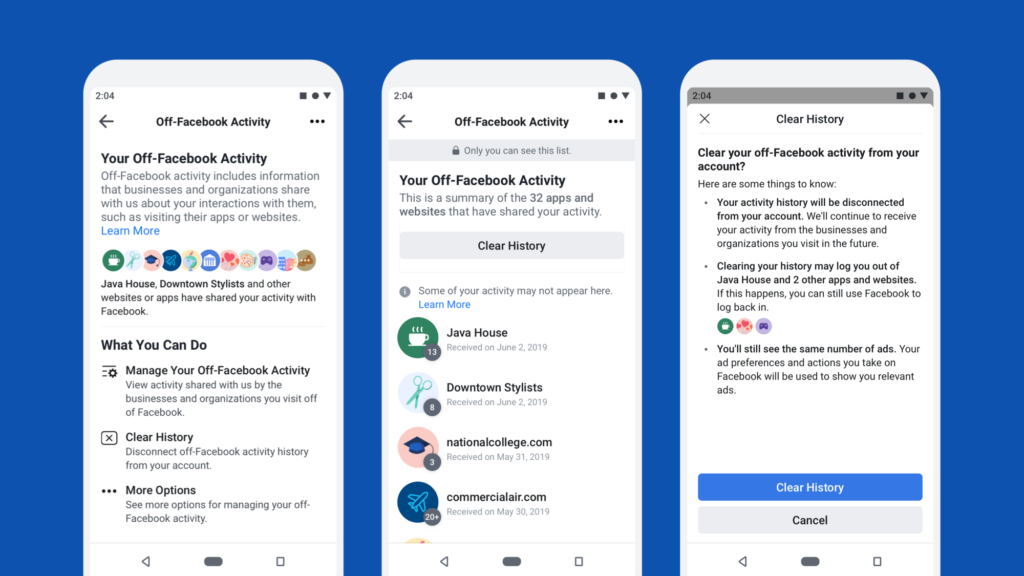
It is important to note that Meta’s vocabulary in this sphere has evolved over time, thus the readers must be cautious about outdated terminology. Nonetheless, the problem of privacy is still quite topical: your activity online does not necessarily remain within the confines of the site where it takes place. The use of advertising and analytics by businesses helps them learn more about their visitors and assess their campaigns, and some of the information can be shared with technology companies.
That is precisely why the importance of off-Meta technology tools needs to be mentioned. If you ever found yourself thinking that an ad was somehow mysteriously tied to the content that you looked for somewhere else, this is one of the components of the ecosystem that deserves consideration. This does not mean that Facebook was reading minds; digital advertising is simply incredibly good at making coincidences seem suspiciously personalized.
Consider browsing an online shop and taking a look at running shoes. You do not purchase anything, close the website and never give it another thought. Sometime later, you visit Facebook and find yourself looking at an ad for running items. Such an experience might be scary to some degree because the two events occurred on completely different websites. The piece of information that is missing here is that digital advertising systems nowadays can connect pieces of information from different environments using certain technologies and identifiers.
This is when practical knowledge of Off Facebook Activity is applied instead of theoretical one. When one reviews all the available activity controls via his Meta account, then he will get a better idea about what kind of interaction was linked with his account and what options there are. Remember that blocking/disconnecting/taking control activity does not imply that the outside website stops collecting any data.
Each website is fully responsible for data collection on its side, and there is no magic trick to make all copies of information disappear from everywhere. This detail is especially important since privacy controls are very powerful but cannot change the past.
Phrase “what Facebook knows about me” may seem quite easy at first glance, but the question “how Facebook knows that” turns out to be much more complex. Information could be either entered directly by user, generated by user’s actions, provided by other people and technical information concerning platform operations. Some of the information could be used for personalization, improvement of product or providing security services.
However, none of these things means that a representative of the company sits in a room going over the details of your online existence. Major social networking sites use automated systems to handle all of this data on a huge scale and are controlled by the technological and organizational systems of security.
Nevertheless, automation does not mean that the problem of privacy becomes unnecessary. On the contrary, automation becomes yet another example of why privacy settings are important. The recommendation system does not require any human representatives to be able to get familiar with your interests to use this information in their algorithm.
The more often you engage with a certain subject, creators or groups, the more personalized your experience will be. It might be beneficial because you certainly would not like to see a cooking lover being recommended all kinds of articles about tractor engines. This is why it is good to understand how personalization occurs.
One of the simplest methods to understand the connection between data and online experience is personalized advertising. You are looking for some product, visiting some store, discussing some topics with your friends, and suddenly ads appear and start reading your mind. In some cases, there is an obvious reason why certain ads appeared. In others, it’s just a simple coincidence. Or in some cases, there are other people around you who are interested in the same topics.
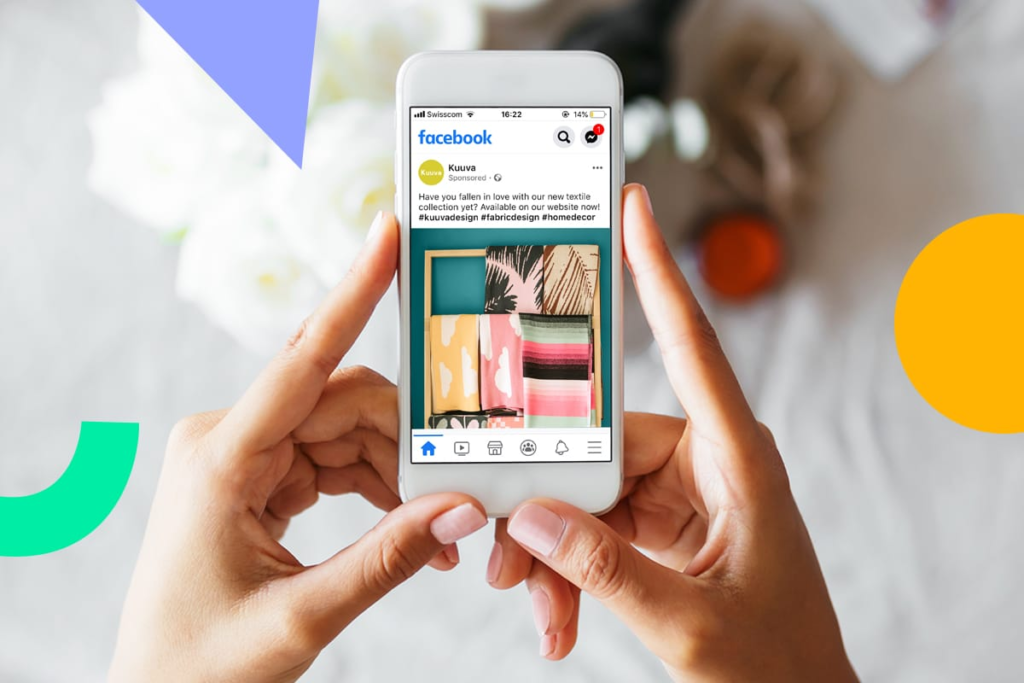
The Facebook advertising system offers tools which help users learn the reasons why certain ads were shown to them. The approach “Why am I seeing this ad?” is quite helpful in this context because it shifts attention from suspicious attitudes to real information. If an advertisement gives you any discomfort, you can better use the opportunity to study the available explanations and preferences rather than cry out loud at your computer that “Facebook is spying on me!”. Your computer, by the way, is not guilty of anything.
Advertisements explain themselves as there are numerous pieces of information which could have influenced the decision of the advertising system to show you the ad. Depending on the system and the settings it utilizes, that could be an individual’s features, the interaction, his interests, or other targeting factors. Getting an ad doesn’t always imply that Facebook heard your search five minutes ago and sold it to an advertiser.
Still, I would suggest analyzing advertisements in case you feel something is very personal. This will help you to get more information about how the system defines your interests and how you could influence this process to make more informed decisions regarding your preferences. In addition, this develops a good privacy habit: do some investigation before jumping to conclusions. The management of Facebook’s privacy is significantly easier when you understand what exactly changes when pressing a certain button.
Data retention is one more topic, where privacy articles tend to simplify things too much. It is simple enough to state, “Facebook deletes all your information after X days,” but such statements can sometimes mislead. The retention period depends on what kind of information you are dealing with – some information might be retained while the account is active, while others will be deleted when they are no longer necessary. Still, some pieces of information may have to be kept due to security, legal or other reasons.
It is because of these reasons that I would recommend avoiding stating that all information is deleted by Facebook after certain amount of days. An explanation of data retention issues should not pretend that deleting something from your profile equals deleting all copies of that information right away. Also, closing your account does not necessarily mean that a corporation will be able to delete all information in question.
For instance, when you delete an image from your profile, there may be several technical processes and even different systems to process this information. This does not mean that your image is left somewhere on some public database forever. It means that a process of deletion is a multi-stage process for digital data. It works in the same way for other types of information and there are detailed explanations of such processes in the privacy policy and not one universal timer.
This is the reason why the issue of data retention should be addressed in a different way while discussing Facebook privacy. The question “When does Facebook delete everything?” should be replaced by “What happens to different categories of information if I delete, disconnect or stop using them?” Such question will lead to a much more realistic result and will help to avoid dangerous steps based on wrong assumptions.
Privacy settings can be helpful, but they will only work to your benefit depending on what you need from them. If you tweak the setting that regulates access to your posts, it will influence your visibility. But it does not mean Facebook will stop processing information to run the platform. If you untie off-platform activity from your account, it does not mean the external organization stops tracking you and storing information. If you modify the advertising preferences, advertisements do not just disappear.
This information helps you take full control of your account. Privacy is not about looking for one magic “make me invisible” button since it unfortunately does not exist. What you have is a few layers to manage: what you share, who gets to see it, what other apps and services are connected to your account, your advertising preferences, permissions and activity controls. Once you realize privacy is actually about several choices, not just one setting, the whole concept seems more accessible.
Taking control doesn’t mean that you must immediately delete your Facebook account right away and write an elaborate 17-paragraph goodbye letter to the community. It all starts much simpler. Take a look at your privacy settings, who can access your data, your activity log, connected apps or other services. If you haven’t checked this for years, there will likely be plenty of choices made simply because you chose “continue” when creating an account.
I would also recommend making reviews of your privacy choices a regular habit rather than an emergency reaction. A quick review once in a while is much better than spending three hours changing all your settings because you have seen some frightening article on the Internet. Go over the official Privacy Centre and account settings to see what is possible now, since interfaces change and new features get added all the time.
Begin by examining the information that can be seen from your profile page. Consider whether you would like others who are complete strangers or just acquaintances to know your old posts, personal information, birthday, or any other personal information. Examine your audience and activity settings afterward. You should then examine your advertising settings and the reasons behind the ads that appear on your profile.
Do not undervalue the importance of deleting any information you do not wish to have public anymore. Most users take many years before they ever go through their old posts, photos, likes, and public comments. Your opinion from 2014 regarding a television series may not need to be kept in your digital museum forever. This is where a privacy check becomes important.
Disconnecting or managing activity related to third-party businesses and websites will impact the way the particular information is linked with your Meta account, but there are some limitations that users should be aware of. This process does not make the external website forget about your visit; if the online retailer collected some information about you, then their privacy policy is going to regulate that information. The control of Meta and control of the retailer are two different pieces of this picture.
This is perhaps the most significant lesson that modern people should learn in relation to their privacy issues: data is often stored at different places. When you engage in an interaction with any online service, different companies might have a chance to process different aspects of this interaction. That is why you should go further than Facebook, itself. For those who are concerned about their privacy, it is recommended to read privacy policies of all the services that you use, check browser permissions, restrict the access of apps, and avoid providing too much information to websites.
These terms like “delete,” “disconnect,” “hide,” and “turn off” are often used interchangeably as synonyms but actually, their meaning varies. Deleting means removing the information or content from a specific system or context. Disconnecting an action can affect the way some information correlates with your account. Hiding something may simply influence the visibility of information. Turning off something can prevent a certain kind of personalization or tracking process but allow the other one.
Recognizing these differences can simplify the process of using Facebook privacy controls. Ask yourself just one question before changing anything: “What exactly will this action change?” This question can help you avoid frustration. Do not expect that the control which disconnects your activities from the account will delete the original activity from the organization where it was performed. Do not think that changing the setting which impacts on ad personalization will block all advertisements.
The third-party applications require special consideration since they create an additional layer between you and Facebook. In the past few years, people have connected numerous applications and webpages to their social media accounts because continuing with Facebook was easier than creating another password. Easy? Certainly. Something you should do blindly? Definitely not.
My suggestion is to regularly check which applications are connected and disconnect those you do not use or recognize anymore. Permission request works the same way. If some weird quiz asks for permissions that do not have anything in common with the purpose of its operation, this should ring the alarm. You do not have to be a cybersecurity specialist in order to make better decisions. Just a little bit of skepticism.
We tend to pay too much attention to what Facebook is collecting and forget about the simplest form of protecting our privacy that we actually have at hand: what we decide to publish ourselves. Publishing your home address, your future whereabouts, your telephone number, workplace data, your children’s school details or private documentation may lead to serious threats no matter how advanced the privacy settings of the platform are.
That is when taking control becomes a matter of one’s personal responsibility rather than a part of platform functionality. When sharing something, I always try to envision it being posted on a poster in my neighborhood. In case it makes me uncomfortable, I should probably refrain from posting that online. You do not have to be a secret agent, but there is no need to write an internet a how-to on your life.
There is no privacy policy capable of ensuring that your information will never be exposed, misused or compromised. Technology companies apply security measures and policies in order to provide protection of information; however, any large-scale digital system operates in an environment that includes technological vulnerabilities, human mistakes, malice and evolving threats. This does not mean that you have to be overly paranoid. This means that you have to stop using privacy settings as a magic shield.
The principle is valid all over the internet. An effective privacy policy is helpful, but it cannot substitute one’s personal security habits. Use strong and unique passwords, utilize security measures if they are offered and be careful about suspicious links.
The difference between privacy and security is subtle and lies in their definition. Privacy is concerned with who will have the right to access the information, and why; while security focuses on how the information and account will be protected from any unauthorized access.
In my opinion, the smartest privacy practice is quite boring: it comes down to being aware of the information you share and your current settings, deleting unnecessary associations and repeating the routine periodically. No cool hacks needed. You don’t have to have a seven-screen interface with flashing alarms of a privacy dashboard to be safe. You simply have to be aware and consistent.
Your digital footprint is made of thousands of little steps. A single Facebook post may not mean much. An app permission might look innocent. An ad engagement won’t do any harm by itself. But thousands of little steps can lead to a complete portrait of your online habits.
If today I had to do a complete privacy clean up, I would avoid a few common errors. First, I wouldn’t believe the hype around posts going viral which state that typing a certain legal disclaimer in my Facebook status will change the policy of the company. Second, I wouldn’t believe that deleting my Facebook account would delete all my personal information from every other site or service where I have interacted. Third, I wouldn’t use an old blog post as the authority on my settings at the moment.
In addition, I wouldn’t click through permissions just because of convenience. Everything will be fine until I find out after six months that I gave access to one of the apps that I have forgotten about to something I didn’t plan to give access to. Finally, I wouldn’t freak out each time there is an advertisement based on something personalized. Sometimes, the reason is very good targeting, sometimes it’s just normal audience behavior, and sometimes it’s just plain coincidence.
It is important to realize that Facebook’s privacy discussion is a part of an even greater trend of privacy considerations around the globe. Consent, targeted advertising, artificial intelligence, data minimization and other issues are still hot topics for governments, regulators, tech companies and customers. Privacy expectations may vary based on geographical location, which is one more argument why sweeping statements concerning “users of Facebook worldwide” need to be used with caution.
From the perspective of users, the lesson is straightforward. Never treat privacy as some sort of invention by Facebook that Facebook alone should address. Google, TikTok, Amazon, ad agencies, apps, retail sites and thousands of other smaller sites work within their own ecosystems of data. Your digital identity is scattered. Understanding how privacy works at Facebook will help you understand how privacy works elsewhere.
By 2026, discussions about privacy are also increasingly related to artificial intelligence and the issue of personalized experience and automated decision-making. With new features becoming available, one should pay attention to how the information about the data collected and used by platforms is provided, how features work and what controls one can use.
Products in Meta’s portfolio keep evolving, hence, changes to privacy-related information are possible along with the product development. This is yet another reason why using policy and privacy-related resources of the company to obtain current information is more relevant than referring to the articles written some years back.
I would also pay attention to the difference between marketing rhetoric and the reality of the situation. While a company declaring its commitment to privacy sounds good, it is important to understand what is actually controllable. The most informative privacy information is actionable. Thus, if a policy states some point, but offers you no clue how to find your settings, keep looking for answers in the official Privacy Centre and in account settings.
Privacy checks don’t have to be all-day endeavors. First, consider the privacy settings and look at the people that might access your profile or posts. Then, do a little cleaning by going through your profile and eliminating anything that you feel you should not be publicizing. Finally, look into any connected apps, check on advertising and activity management settings.
Most importantly, do it periodically. Privacy cannot be checked once and for all since both platforms and personal behavior constantly evolve. That Facebook account that you created five years ago probably contains choices that were made in less than five minutes without even glancing at anything. But those five minutes that it would take to rethink them today could save you years of exposure. And that’s what I call taking control.
Perhaps the most important thing I learned about Facebook privacy is that there is no need to either naively trust the platform or completely avoid using social media. Instead, there is a far more rational way – to know how information is processed, understand what you can control, and make conscious decisions on what to post. The Off Facebook Activity, advertising personalization, third-party integration, privacy settings, and data storage are different aspects of one overall picture that cannot be evaluated by means of sensational headlines or out-of-date allegations.
An up-to-date privacy policy provides some background information about the company’s policies, yet your personal actions are still very important. Check your settings, delete all unnecessary app connections, avoid publishing personal information without thinking about it, and use privacy features provided by Facebook and Meta. According to the official Facebook privacy hub, now, the first things to check for Facebook’s users include the Privacy Policy, Privacy Centre, settings, and activity controls.
Privacy does not have to be an extreme obsession. It is something that ought to be considered in the same light as the door of your house. While you may not be standing there for six hours admiring the lock, you certainly will not be opening the door wide in case of “no harm done before.” This approach can apply even when on the internet. Perfect privacy is not what makes people make better privacy choices. It is merely paying attention and understanding.
1. Is Facebook Privacy completely guaranteed?
No. Privacy controls can reduce exposure and give users more choices, but no online platform can guarantee that information will never be compromised or misused. Good account security and careful sharing habits remain important.
2. What is Off Facebook Activity?
Off Facebook Activity refers to information that businesses and organizations can send to Meta about people’s interactions with their apps and websites through Meta’s business tools. Meta has changed terminology and presentation around these controls over time, so current account settings should be checked rather than relying on older tutorials.
3. Does deleting a Facebook post delete it everywhere?
Not necessarily. Deleting content from Facebook does not automatically erase copies, screenshots or information held by other services. Data retention can also involve different processes and timeframes depending on the information and circumstances.
4. How can I improve my Facebook Privacy?
Start by reviewing your audience settings, profile information, activity history, connected apps and advertising preferences. Avoid oversharing sensitive information and periodically revisit your account settings as Facebook’s features change.
5. Does changing advertising preferences stop Facebook ads?
Not necessarily. Advertising preferences can influence how ads are personalized or the choices available to you, but they do not automatically mean that advertising disappears. The important step is understanding what each available control actually changes.

Share your details, and we will get back to you shortly!
This will close in 0 seconds
Share your details, and we will get back to you shortly!
This will close in 0 seconds





[…] If You Use Facebook, Here’s 1 Simple Facebook Privacy Check You Shouldn’t Ignore […]